
ការ បង្ហាញ អន្តរសកម្ម គឺ ជា ឧបករណ៍ សំខាន់ ក្នុង សៀវភៅ បុរាណ ។ ពួក វា ទៀត មិន មែន ជា អេក្រង់ ធម្មតា ទេ - ពួកវា កំពុង បង្រៀន ចំណុច ដែល បង្កើន ការ ចូលរួម ប្រសើរ និង ការ ផ្ដល់ កម្រិត ពណ៌ បន្ទាត់ ។ ការ ជ្រើស ការ បង្ហាញ អន្តរសកម្ម ត្រឹមត្រូវ គឺ មិន មែន តែ ការ សម្រេចចិត្ត ចង្អុល ទេ ។ វា គឺ ជា ការ អប់រំ អប់រំ
រវាង គ្រោងការណ៍ អប់រំ ការ បង្ហាញ Qtenboard អន្តរសកម្ម និង បណ្ដាញ មេឌៀ ផ្សេង ទៀត ត្រូវ បាន ប្រៀបធៀប ។ ។
អត្ថបទ នេះ ប្រៀបធៀប លក្ខណៈ ពិសេស សំខាន់ បំផុត ចំពោះ ការ បង្រៀន ៖
ការ ប្រៀបធៀប ទាំងអស់ គឺ មាន មូលដ្ឋាន លើ លក្ខណៈ ពិសេស ដែល មាន គ្មាន ការ ជាវ បន្ថែម ដោយ ប្រាជ្ញា ដែល ប្រាកដ ថា សប្ដាហ៍ ទទួល ការ ប្រយោជន៍ ត្រឹមត្រូវ និង ត្រឹមត្រូវ ។
ដើម្បី ធ្វើ ឲ្យ បច្ចេកទេស មាន ប្រយោជន៍ ការ តភ្ជាប់ ឧបករណ៍ ត្រូវ តែ ធម្មតា និង ទុកចិត្ត ។
Qtenboard រួម បញ្ចូល ប្រព័ន្ធ រួម បញ្ចូល ឥតខ្សែ ដែល អនុញ្ញាត ៖
តម្រូវ បណ្ដាញ ផ្សេង ទៀត ភាគ ច្រើន ៖
នេះ យឺត និង បង្កើន ពិបាក បង្ហាត់ បង្ហាញ ។
ចំណារ ពន្យល់ គឺ ជា លក្ខណៈ ពិសេស មួយ ដែល បាន ប្រើ ធម្មតា បំផុត ក្នុង សៀវភៅ ។
Qtenboard គាំទ្រ បច្ចេកទេស Windows/Mac pen កម្រិត ខ្ពស់ ៖
[ រូបភាព នៅ ទំព័រ ២៦]
ថ្ម ដែល បញ្ចូល ភាគ ច្រើន ប្រើ ចំណារ ពន្យល់ ៖
ស.
ការ ចូលរួម គឺ ជា ផ្នែក សំខាន់ នៃ សកម្មភាព ថ្នាក់ ឥឡូវ នេះ ។
Qtenboard គាំទ្រ ចំណុច ៤០ ចំណុច ដែល អនុញ្ញាត ៖
សមត្ថភាព សម្រាប់ ការងារ ក្រុម សកម្មភាព STEM និង ល្បែង អន្តរសកម្ម ។
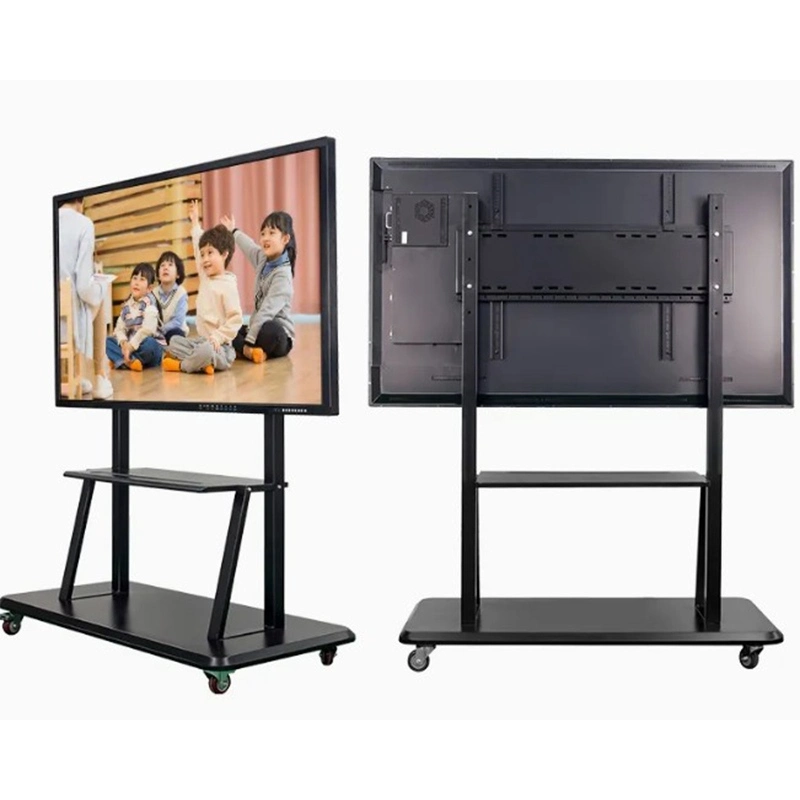
| សំឡេង | |
|---|---|
| QtenboardComment | |
| ទំហំ | |
| 55'' / 65'' / 75'' / 86'' / 98'' / 105'' / 110'' | |
| ម៉ូល | |
| QM-55HY / QM-65HY / QM-75HY / QM-86HY / QM- 98HY / QM-105HY / QM-110HY | |
| ការ បញ្ជាក់ LCD | |
| គុណភាព បង្ហាញ | គុណភាព បង្ហាញ 3840*2160 4K |
| ពន្លឺ | 350 cm/ m² / 400 cm/ m² / 450 cm / m² |
| សមាមាត្រ កម្រិត ពណ៌ | 4000: 1 ( ប្រភេទ) |
| ជម្រៅ ពណ៌ | 16. 7M( ៨ ប៊ីត) |
| មុំ មើល ឃើញ | 178 °( H) / 178 °( V) |
| ជីវិត LCD | 60,000 នាក់ |
| ការ លម្អិត | |
| ស៊ីភីយូ | 9679 / 3576 / 311D2 / V100 / 3588 |
| Android OS | Android 14.0 |
| រ៉ាម | 4 32G / 8 128G / 16 256G (ជម្រើស) |
| WIFI | ២. ៤G & ៥G |
| ប្ល៊ូធូស | 5.2 |
| ចាក់សោ កូនComment | គាំទ្រ@ info: whatsthis |
| ទិដ្ឋភាព ឥត ខ្សែ | គាំទ្រ@ info: whatsthis |
| ល្បឿន អេក្រង់ ចំណុច | |
| ប្រភេទ ចំណុច | ការ តភ្ជាប់ អ៊ីនហ្វ្រា រ៉េប សូល |
| ចំណុច ចំណុច | ២០- ៥0 ចំណុច |
| កម្ពស់ ចំណុច | ១ មែល |
| ម៉ាស៊ីន ថត | |
| ម៉ាស៊ីន ថត និង មីគី | ជម្រើស 4800MP (8 array Mic) |
| ថាមវន្ត | |
| អ្នក និយាយComment | 20W* ២ |
| អនុញ្ញាត | ≤ 0.5W |
| ការ ផ្ដល់ ថាមពល | AC100V-240V,50-60 Hz |
| បរិស្ថាន ការងារ | |
| ពណ៌ ការងារ | 0℃ ~40℃ |
| ភាព ស្រអាប់ ការងារ | 20% ~ 85% (គ្មាន ការ បង្ហាញ) |
| ការ ផ្ទុក tempuratur | -10℃ ~ 60℃ |
| ភាព ត្រឹមត្រូវ ផ្ទុក@ info: whatsthis | 10% ~ 60% (គ្មាន ការ បង្ហាញ) |
| ចំណុចប្រទាក់ | |
| ប្រភេទ B 2.0, type- C, HDMI in, HDMI out, USB, USB- B, DP, VGA, TF កាត TF MIC, RJ45 in, RJ45 ចេញ, RS232 ក្នុង (ជម្រើស) | |
បាន រចនា ជាក់លាក់ សម្រាប់ សៀវភៅ ពិត ៖
។
ភាគ ច្រើន ផ្ដល់ តែ អនុគមន៍ មូលដ្ឋាន ដូចជា ៖
ឧបករណ៍ បង្រៀន ដែល បាន ធ្វើ ឲ្យ ប្រសើរ ធម្មតា ត្រូវការ ការ ចូល ដំណើរការ ជាវ ។
បណ្ដាញ ជា ច្រើន និយាយ ថា "ប្រព័ន្ធ អង់រ៉ូដ" ប៉ុន្តែ ការ ប្រើប្រាស់ ពិត ពិត ផ្សេង ទៀត ។
គាំទ្រ Qtenboard ៖
ដោយ សារ វិញ្ញាបនបត្រ EDLA ស៊ីភីយូ អនុញ្ញាត ឲ្យ ធ្វើការ កម្មវិធី រលឹម និង ស្ថិត ។
រវាង វិធីសាស្ត្រ គ្រាប់ ចុច ទាំងអស់ Qtenboard ផ្ដល់ នូវ ដំណោះស្រាយ ពេញលេញ បំផុត, អ្នក បង្រៀន និង រួចរាល់ ពេល អនាគត ៖
Qtenboard គឺ ជា ច្រើន ជាង ការ បង្ហាញ អន្តរសកម្ម គឺ ជា គំរូ រយៈពេល សម្រាប់ សិក្សា ឌីជីថល បច្ចុប្បន្ន ។
ចុច ដើម្បី អាន លម្អិត លម្អិត លម្អិត និង សិក្សា អំពី លក្ខណៈ ពិសេស មុខងារ របស់ វា និង ការ ប្រតិបត្តិការ ពិត ។
📖អាន លទ្ធផល@ info: whatsthis
 HKM
HKM
 EN
EN  MAY
MAY  TH
TH  CHT
CHT  ID
ID  BUR
BUR  FIL
FIL  LAO
LAO  SIN
SIN  VIE
VIE