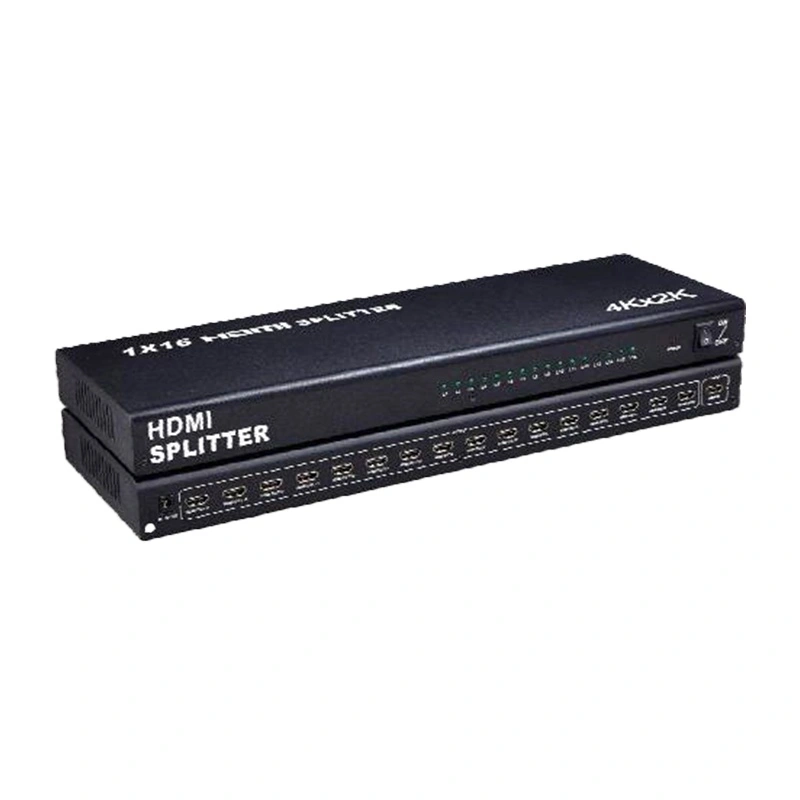
កម្មវិធី បំបែក 4K HDMI ដែល បាន ចាប់ផ្ដើម ដោយ Qtenboard ត្រូវ បាន រចនា ពិសេស សម្រាប់ សញ្ញា ដែល ទាមទារ " ប្រភព សញ្ញា តែ សម្រាប់ បង្ហាញ ស្ថានីយ ច្រើន " វា អាច ចែកចាយ សញ្ញា ពី ឧបករណ៍ សញ្ញា ១ HD ( ដូចជា កុំព្យូទ័រ ឌីវីឌី ប្រអប់ set- top, PS3) ដើម្បី បង្ហាញ ស្ថានីយ ១៦ ដែល គាំទ្រ HDMI ( ដូចជា ម៉ូនីទ័រ គម្រោង ទូរទស្សន៍) ។
រវាង ពេលវេលា វា មាន មុខងារ នៃ ការ បង្កើន សញ្ញា HDMI ដើម្បី ប្រាកដ ថា មិន មាន គុណភាព របស់ រូបភាព HD ទេ ។ ការ រៀបចំ ការ មើល វីដេអូ សមកាលកម្ម ឧបករណ៍ ច្រើន ការ ត្រួតពិនិត្យ ការ បង្ហាញ ការ បង្ហាញ និង សកម្មភាព ផ្សេង ទៀត ។
គាំទ្រ គុណភាព បង្ហាញ អតិបរមា ដល់ 3840X2160 / 30 Hz (4K កម្រិត) និង ទ្រង់ទ្រាយ វីដេអូ 3D ការ ស្ដារ សេចក្ដី លម្អិត របស់ វីដេអូ កំណត់ កម្រិត ខ្ពស់ និង រូបភាព 3D ។
មាន ជាមួយ ស្តង់ដារ HDMI 1. 4b ដែល មាន កម្រិត ដៃ អតិបរមា ៣៤ ម. Hz ជម្រៅ ពណ៌ ៨០/ ១២ ប៊ីត សម្រាប់ រូបភាព តូចៗ ។
ជាមួយ ខ្លាំង AWG26 ស្តង់ដារ ៖ 15m បញ្ជូន សម្រាប់ 1080P & ខាង ក្រោម 10 m សម្រាប់ 4K, ដែល ទាក់ទង នឹង ទំហំ ធំ ។
បញ្ចូល ៖ ឌីវីឌី អ្នកទទួល A/V, STB, PS3 លទ្ធផល ៖ ម៉ូនីទ័រ/ទូរស័ព្ទ/ គម្រោង ដែល បាន គាំទ្រ HDMI ទាំងអស់ គ្មាន ការ កិរិយាស័ព្ទ ផ្ទៀងផ្ទាត់ ភាព ត្រឹមត្រូវ ។
បាន គាំទ្រ ជាមួយ អាដាប់ទ័រ 12V / 2A (AC 100V-240V 50/60 HTML) អតិបរមា 1. 15A បច្ចុប្បន្ន ។ ដោះស្រាយ ការ ផ្អាក សញ្ញា ។
| ប្រភេទ | សេចក្ដី លម្អិត |
|---|---|
| កំណែ HDMI | HDMI 1. 4b |
| គុណភាព បង្ហាញ អតិបរមា | 3840X2160 / 30 Hz (4K) |
| គាំទ្រ វីដេអូ | ជម្រៅ ពណ៌ ៨/10/ ១២- ប៊ីត ទ្រង់ទ្រាយ វីដេអូ 3D |
| គាំទ្រ អូឌីយ៉ូ | DTS- HD/Dolby-TrueHD/DTS/Dolby-AC3 / DDSD |
| ការ បញ្ជូន អនុញ្ញាត | កម្រិត កម្រិត អតិបរមា ៖ ៣៤០ មេហ្សែម; បញ្ជូន អតិបរមា ៖ 3.4 Gbps |
| ចំនួន ចំណុច ប្រទាក់ | ច្រក បញ្ចូល HDMI ១៦ ច្រក លទ្ធផល HDMI |
| ប្រវែង Kable (AWG26) | គុណភាព បង្ហាញ 1080P ៖ បញ្ចូល/ចេញ ≤15m; គុណភាព បង្ហាញ 4K ៖ បញ្ចូល/ លទ្ធផល ≤10m |
| ការ បញ្ជាក់ ថាមវន្ត | បញ្ចូល ៖ AC 100V-240V (50/60 HTML); លទ្ធផល ៖ DC 12V / 2A |
| កម្លាំង លុប | 1. 68Kg |
| បរិស្ថាន ប្រតិបត្តិការ | សីតុណ្ហភាព: |
| ប្រតិបត្តិការ បច្ចុប្បន្ន | អតិបរមា 1.15A |
តភ្ជាប់ ប្រភព សញ្ញា ទៅ ច្រក បញ្ចូល ជាមួយ ចំណុច បញ្ចូល ដែល មាន ចន្លោះ ។ ហើយ តភ្ជាប់ ឧបករណ៍ បង្ហាញ ១៦ ( ដូចជា ម៉ូនីទ័រ ទូរទស្សន៍) ទៅ កម្មវិធី បំបែក&# 039; លទ្ធផល ច្រក មួយ តាម មួយ ដែល មាន ១៦ ខៀវ HDMI ។ នេះ អនុញ្ញាត ឧបករណ៍ ១៦ ដើម្បី បង្ហាញ រូបភាព ដូចគ្នា ដោយ គ្មាន ការ ពន្យារ រូបភាព ឬ កោត ខ្ពស់ ដែល សមរម្យ សម្រាប់ ជួរជុល ការ ត្រួត ពិនិត្យ មើល មជ្ឈមណ្ឌល បញ្ជា បង្រៀន ថ្នាក់ និង វិធីសាស្ត្រ ផ្សេង ទៀត ។
នៅ ពេល ខ្សែ HDMI វែង ពេក ហើយ បង្កើន ការ តភ្ជាប់ សញ្ញា ការ តភ្ជាប់ កម្មវិធី បំបែក ទៅ ចុង លទ្ធផល របស់ ខ្សែ HDMI អាច ធ្វើ ឲ្យ សញ្ញា សកម្ម ។ វា ប្រាកដ ថា គុណភាព រូបភាព នៅ ថែទាំ HD និង ស្ថិត នៅ ក្នុង ចម្ងាយ បញ្ជូន អតិបរមា (15 m/10 m) ដោយ ដោះស្រាយ បញ្ហា នៃ សញ្ញា នៅ ក្នុង ថ្នាក់ ចម្ងាយ ។
សីតុណ្ហភាព ប្រតិបត្តិការ ជួរ ពី - 15 ℃ (បរិស្ថាន សីតុណ្ហភាព ទាប) to ៥៥ ℃ (បរិស្ថាន សីតុណ្ហភាព កម្រិត ខ្ពស់) និង ជួរ ការ លៃតម្រូវ ភាព ត្រឹមត្រូវ គឺ ៥% ~ ៩០% RH ថាតើ វា ជា ការ ត្រួត ពិន្ទុ ខ្លាំង ឬ ការ បង្ហាញ នៅ ក្នុង ខាង ក្នុង ឧបករណ៍ អាច ប្រតិបត្តិ ជា ធម្មតា ជាមួយ ភាព ត្រឹមត្រូវ ។
ម៉ាស៊ីន 1 បាន តភ្ជាប់ ទៅ កាន់ ១៦ ម៉ូនីទ័រ ដែល អនុញ្ញាត ឲ្យ ភ្ញៀវ ទាំងអស់ មើល ការ ជួប PPTs និង ធនធាន វីដេអូ ដោយ សម័យ ។
ឆានែល ១ នៃ សញ្ញា ម៉ាស៊ីន ត្រួតពិនិត្យ ដែល បាន ចែកចាយ ទៅកាន់ ១៦ អេក្រង់ ត្រួត ពិនិត្យ សម្រាប់ ការ ត្រួតពិនិត្យ ទាំងអស់ ដោយ មិន បាន បញ្ចប់ ។
សញ្ញា ក្បួន អ្នក បង្រៀន &# 039 s PC ត្រូវ បាន ធ្វើ សមកាលកម្ម ទៅ កាន់ ម៉ូនីទ័រ ១៦ ដើម្បី បង្កើន ភាព បង្រៀន ។
ឧបករណ៍ ចាក់ ទី ១ ដែល បាន តភ្ជាប់ ទៅកាន់ ការ បង្ហាញ អេក្រង់ ១៦ ដើម្បី បង្ហាញ វីដេអូ និង រូបភាព បង្កើន លទ្ធផល ជា គ្នា ។

 HKM
HKM
 EN
EN  MAY
MAY  TH
TH  CHT
CHT  ID
ID  BUR
BUR  FIL
FIL  LAO
LAO  SIN
SIN  VIE
VIE